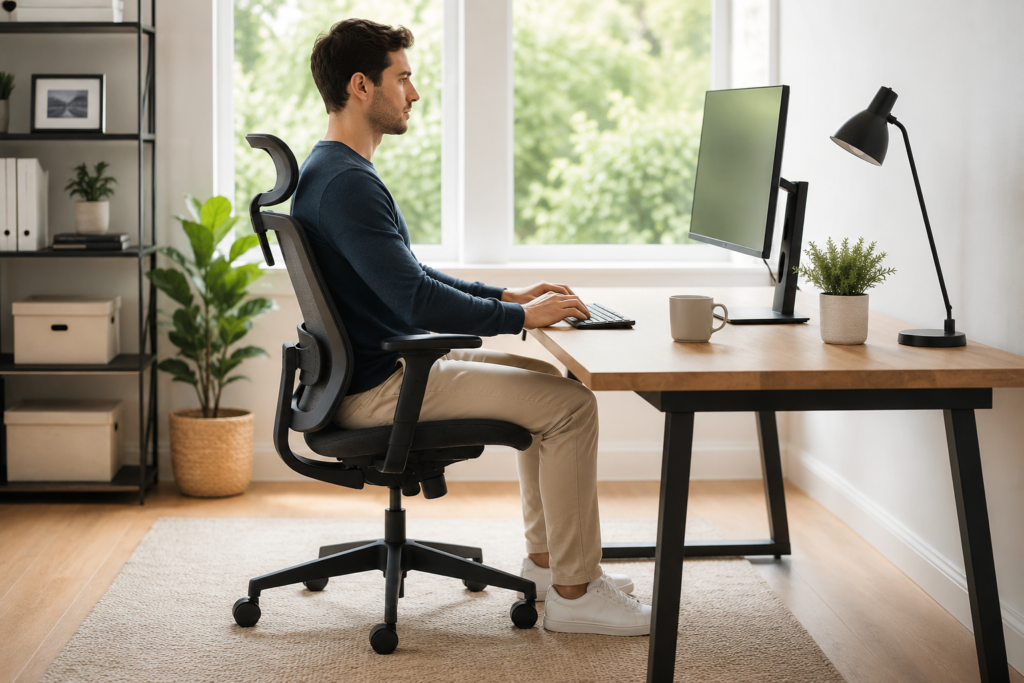
Learn how to sit more comfortably with lower back pain, including chair setup, lumbar support, posture tips, movement breaks, and common sitting mistakes.
If your lower back starts aching after you have been sitting for a while, your sitting position may be part of the problem.
Sitting itself is not necessarily harmful, but staying in one position for a long time—especially when your back is poorly supported—can contribute to stiffness, muscle fatigue, and discomfort.
You may notice yourself gradually sliding forward in your chair, rounding your shoulders, leaning toward your computer, or sitting with your legs tucked underneath you. These positions can feel comfortable for a few minutes but become uncomfortable over time.
The good news is that you don’t need to sit perfectly all day.
A supportive chair setup, comfortable posture, and regular movement can often make sitting easier on your lower back.
In this guide, we’ll look at:
- A comfortable sitting position for lower back pain
- How to adjust your chair and workspace
- Whether lumbar support can help
- Common sitting mistakes
- How often to get up and move
- What to do when your back already hurts after sitting
- When persistent back pain deserves medical attention
What Is the Best Sitting Position for Lower Back Pain?
There isn’t one perfect posture that works for every person. Body proportions, chair design, existing pain, and the type of work you’re doing all matter.
However, a good starting position is one that keeps your body supported without forcing you to hold yourself rigidly.
Try the following:
- Place both feet comfortably on the floor or on a footrest.
- Keep your knees around hip level or slightly lower if comfortable.
- Sit far enough back that the chair supports your pelvis and lower back.
- Allow your shoulders to remain relaxed rather than pulled backward.
- Keep your elbows comfortably near your sides.
- Position your computer screen so you don’t repeatedly lean forward or look sharply downward.
- Change your position regularly instead of trying to maintain one posture for hours.
Think supported and comfortable, not perfectly straight.
Trying to force yourself into a stiff posture can create additional muscle fatigue.
Why Can Your Lower Back Hurt When You Sit?
Lower back discomfort after sitting can have several possible causes.
One of the simplest is lack of movement.
When you remain seated for an extended period, the muscles around your hips and back stay relatively still. Some people become stiff or uncomfortable, especially when they remain in the same position for hours.
Your chair setup can contribute as well.
For example, a chair that is too high may leave your feet dangling. A seat that is too deep may prevent you from comfortably using the backrest. A computer positioned too far away may cause you to repeatedly lean forward.
Slouching isn’t automatically dangerous, either. The bigger issue for many people is staying in any one position for too long.
If sitting is consistently triggering your symptoms, you may also want to read Why Lower Back Pain Gets Worse After Sitting for a closer look at why prolonged sitting can become uncomfortable.
How to Set Up Your Chair for Better Lower Back Support
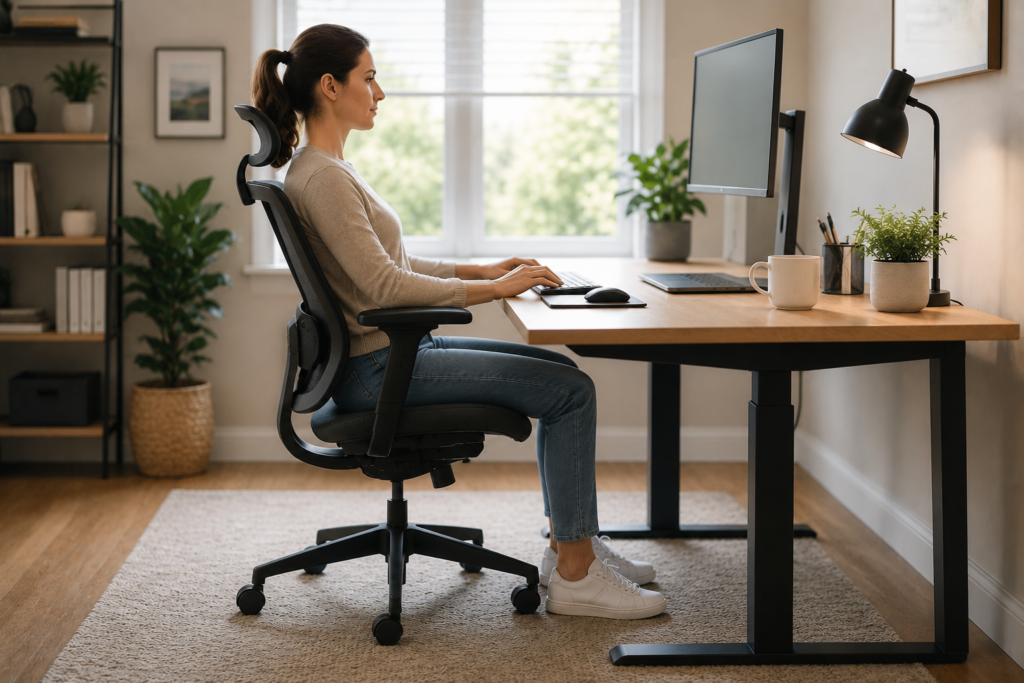
You don’t necessarily need an expensive ergonomic chair.
Start by adjusting the chair you already have.
1. Put Your Feet on a Stable Surface
Your feet should rest comfortably rather than hanging in the air.
If your chair must be raised because of your desk height, consider using a footrest or another stable surface designed for that purpose.
Having your feet supported can make it easier to sit comfortably without sliding forward.
2. Sit Back in the Chair
If you constantly perch on the front edge of the seat, your backrest cannot provide much support.
Move your hips toward the back of the chair and allow the backrest to support you.
You shouldn’t feel as though you’re balancing yourself throughout the entire workday.
3. Adjust Your Chair Height
Ideally, your feet should remain supported while your knees are roughly level with or slightly below your hips.
There is no need to obsess over achieving an exact angle. Comfort matters.
If adjusting your chair to the proper desk height causes your feet to leave the floor, use a footrest.
4. Support Your Lower Back
Some chairs have built-in lumbar support.
If yours doesn’t, a small lumbar cushion or rolled towel positioned comfortably behind the lower back may help.
The goal isn’t to dramatically arch your spine. You’re simply filling the gap between your lower back and the chair so that you feel supported.
If a lumbar cushion increases your discomfort, stop using it or try repositioning it.
5. Keep Frequently Used Items Close
Your keyboard, mouse, phone, and other frequently used items should be easy to reach.
If you’re repeatedly stretching across the desk or leaning forward to work, your comfortable sitting position won’t last very long.
Your Computer Setup Matters Too
Sometimes what appears to be a posture problem is actually a workspace problem.
Imagine your monitor sitting too low.
You start the morning sitting comfortably. After a few minutes, you lean slightly forward to see the screen. Then your head moves forward. Eventually, you’re hunched over your desk without realizing it.
Try positioning your primary screen directly in front of you at a comfortable viewing height and distance.
Laptop users may find this especially challenging because the keyboard and screen are attached.
For longer work sessions, a laptop stand combined with an external keyboard and mouse can allow you to position the screen more comfortably.
Should You Sit Completely Straight?
No.
You don’t need to sit like you’re posing for a posture diagram.
Your spine naturally has curves, and your body is designed to move.
Trying to hold your shoulders back and your spine perfectly straight for eight hours can become tiring in its own way.
Instead, aim for a relaxed, supported position.
Then change positions.
You might sit upright for a while, recline slightly against your backrest, stand for a few minutes, walk around, and then sit again.
Movement and variation can be just as important as your starting posture.
Common Sitting Habits That May Make You Uncomfortable
If your lower back bothers you while sitting, pay attention to what happens throughout your day.
Sliding Forward in Your Chair
You may begin sitting against the backrest and gradually slide toward the edge.
This often happens when you’re concentrating on a screen.
Periodically check your position and move back into the chair.
Leaning Toward the Monitor
If you repeatedly lean forward, consider whether your screen is too far away, too small, or difficult to see.
Adjusting the workspace may be easier than repeatedly reminding yourself to “sit straight.”
Sitting With Your Wallet in Your Back Pocket
A thick wallet or another object in a back pocket can create an uneven sitting surface.
Remove bulky objects before sitting for long periods.
Staying in One Position for Hours
Even a beautifully designed ergonomic setup cannot replace movement.
Your body generally benefits from changing positions throughout the day.
Working From a Sofa or Bed for Long Periods
Occasionally working from the sofa may feel wonderful, but soft surfaces often make it difficult to maintain comfortable support for extended periods.
If you work from home regularly, a supportive chair and properly positioned work surface may be worth prioritizing.
How Often Should You Get Up From Your Chair?
There isn’t a universal rule that everyone must follow.
A practical strategy is to avoid remaining seated continuously for hours whenever possible.
Consider getting up approximately every 30–60 minutes to:
- Walk around the room
- Refill your water
- Stand while taking a phone call
- Gently change positions
- Perform a comfortable stretch
- Complete a small standing task
You don’t necessarily need a long exercise session.
Even a short movement break changes the position of your hips, spine, and surrounding muscles.
If your back already hurts after prolonged sitting, read Lower Back Hurts After Sitting? Possible Reasons and What May Help for additional strategies.
Can a Lumbar Support Pillow Help?
A lumbar support cushion can be useful for some people, especially when a chair has little lower-back support.
Look for something that feels supportive without aggressively pushing your lower back forward.
A cushion may be particularly useful in:
- Office chairs with flat backrests
- Dining chairs used temporarily for work
- Some car seats
- Certain travel situations
However, more support isn’t automatically better.
If a thick lumbar cushion forces you into an uncomfortable position, a smaller cushion or rolled towel may work better.
Product Option: Lumbar Support Cushion
If your current chair leaves a noticeable gap behind your lower back, a lumbar support cushion may make your setup more comfortable.
When shopping, consider adjustable straps, breathable material, washable covers, and a shape that fits your chair rather than choosing solely based on how thick the cushion looks.
Amazon CTA: Check current lumbar support pillow options and customer reviews on Amazon.
As an Amazon Associate, PathwayToRelief.com may earn from qualifying purchases at no additional cost to you.
What If You Have to Sit All Day for Work?
Many people can’t simply stop sitting.
If your job requires long periods at a computer, focus on making sitting more adaptable rather than eliminating it.
One simple routine could look like this:
Start: Adjust your chair, feet, screen, and keyboard.
During work: Change your sitting position periodically rather than holding yourself rigidly.
Every 30–60 minutes: Stand or move briefly when your schedule allows.
Lunch: If possible, spend a few minutes walking rather than remaining seated for the entire break.
Afternoon: Recheck your chair position. People often gradually slide or lean forward as they become tired.
After work: Change activities and positions instead of immediately moving from your office chair to several more hours on the sofa.
Small habits repeated throughout the day may be more realistic than trying to maintain “perfect posture.”
Can Heat Help When Your Back Feels Tight After Sitting?
Heat can feel soothing when lower-back discomfort is associated with stiffness or muscle tension.
A heating pad may help some people relax tight muscles temporarily, but heat isn’t appropriate for every type of pain or injury.
If you choose to use one, follow the manufacturer’s directions and avoid temperatures or durations that could burn or irritate your skin.
For more detailed guidance, see How to Use a Heating Pad for Lower Back Pain.
Heat should be considered a comfort measure rather than a substitute for determining why persistent pain is occurring.
When Should You Talk to a Healthcare Professional?
Occasional stiffness after sitting may improve when you move or change positions.
However, lower back pain can have many causes, and posture isn’t always responsible.
Consider speaking with a qualified healthcare professional if your pain is persistent, repeatedly worsening, interfering with normal activities, or concerning you.
Seek prompt medical attention for back pain accompanied by symptoms such as new bowel or bladder problems, numbness around the groin or saddle area, significant weakness, fever, unexplained weight loss, or pain following a serious injury.
Frequently Asked Questions
What is the best way to sit when my lower back hurts?
Start with your feet supported, hips toward the back of the chair, lower back comfortably supported, shoulders relaxed, and work materials within easy reach. Most importantly, change positions regularly rather than remaining still for hours.
Should my knees be higher or lower than my hips?
Many people find it comfortable when their knees are around hip level or slightly lower. Your individual comfort and chair setup matter more than achieving an exact angle.
Is a hard chair better for lower back pain?
Not necessarily. A very hard chair may become uncomfortable, while an overly soft chair may provide little support. Look for a stable chair that allows you to sit comfortably with your feet supported and your back against the backrest.
Is it better to sit or stand with lower back pain?
Neither position is automatically best for everyone. Alternating between sitting, standing, and walking may be more comfortable than staying in one position for a prolonged period.
Does lumbar support really help?
It can help some people, particularly when their chair doesn’t support the lower back well. The support should feel comfortable and shouldn’t force your spine into an exaggerated arch.
How long should I sit before standing up?
There isn’t one medically required interval for everyone. If you’re able, consider changing position or moving approximately every 30–60 minutes rather than sitting uninterrupted for several hours.
Final Thoughts
The best sitting position for lower back pain isn’t about maintaining flawless posture every second of the day.
It’s about creating a setup that supports your body and allows you to move.
Start with the basics: support your feet, sit back in your chair, position your screen comfortably, give your lower back enough support, and keep frequently used items within reach.
Then remember the piece that’s easy to overlook:
Change positions.
Your next posture can often be more important than trying to make your current posture perfect.
A supportive workspace combined with regular movement can make long periods of sitting more comfortable—and those small adjustments are much easier to maintain than spending the entire day worrying about whether you’re sitting “correctly.”
The information on PathwayToRelief.com is provided for general educational and informational purposes only and is not intended to diagnose, treat, cure, or prevent any medical condition. It is not a substitute for personalized medical advice, diagnosis, or treatment from a qualified healthcare professional. Seek professional medical care for persistent, severe, worsening, or concerning symptoms.
PathwayToRelief.com may contain affiliate links. If you purchase through certain links, we may earn a commission at no additional cost to you. As an Amazon Associate, PathwayToRelief.com earns from qualifying purchases.