Learn how to sit without lower back pain using proper posture, ergonomic workstation setup, stretches, and daily habits that support a healthier back.
If you spend hours sitting at a desk, driving, or working from home, you’ve probably experienced lower back pain at some point.
The good news is that sitting itself isn’t always the problem—how you sit and how long you stay in one position often make the biggest difference. Poor workstation setup, lack of movement, and unsupported posture can all increase strain on the muscles and joints that support your spine.
This guide will show you how to sit more comfortably, reduce stress on your lower back, and create a workspace that supports better posture throughout the day.
Why Sitting Causes Lower Back Pain
Your spine is designed for movement.
When you remain seated for long periods:
- Your hip flexors tighten.
- Your glute muscles become less active.
- Your core muscles provide less support.
- Pressure increases on your lumbar spine.
- Blood circulation slows.
Over time, these changes may contribute to stiffness, muscle fatigue, and recurring lower back pain. Research suggests that prolonged sitting, fewer movement breaks, and static sitting behavior are associated with low back pain.
Step 1: Sit All the Way Back in Your Chair
Many people sit on the edge of their chair without realizing it.
Instead:
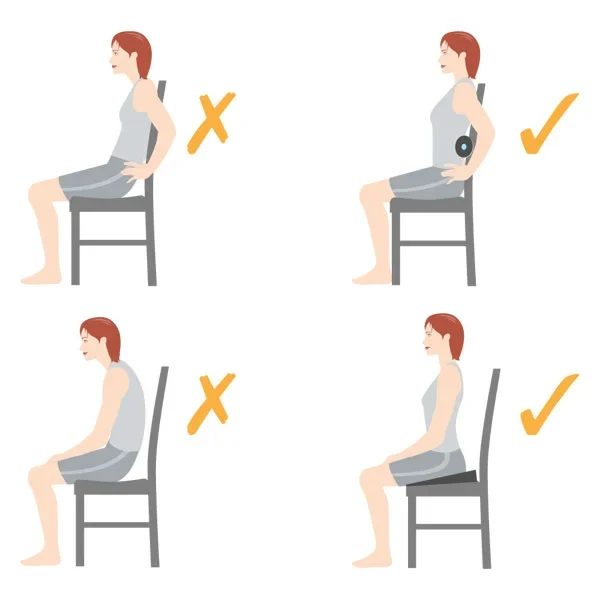
- Sit with your hips fully against the backrest.
- Let the chair support your lower back.
- Keep your shoulders relaxed.
Using the chair correctly reduces unnecessary strain on your spine.
Step 2: Keep Your Feet Flat on the Floor
Your feet create the foundation for good posture.
Try to:
- Keep both feet flat.
- Avoid crossing your legs for long periods.
- Keep your knees approximately level with your hips.
If your feet don’t reach the floor comfortably, consider using a footrest. Ergonomic guidance commonly recommends keeping feet supported and knees near a 90-degree angle.
Step 3: Support Your Lower Back
The natural curve of your lower back should remain supported.
Helpful options include:
- Built-in lumbar support
- A lumbar support cushion
- A rolled towel behind your lower back
Proper lumbar support helps maintain your spine’s natural curve.
Step 4: Position Your Computer Correctly
Poor monitor placement often causes people to lean forward.
Your monitor should be:
- About an arm’s length away.
- At approximately eye level.
- Directly in front of you.
Your keyboard and mouse should allow your elbows to stay close to your body with relaxed shoulders.
Step 5: Take Movement Breaks
Even perfect posture isn’t meant to be held all day.
Aim to:
- Stand every 30–60 minutes.
- Walk for 2–5 minutes.
- Stretch regularly.
- Change positions throughout the day.
Research suggests that regular movement breaks are an important part of reducing sitting-related back discomfort.
Best Stretches for Desk Workers
These gentle stretches may help reduce stiffness after prolonged sitting:
Knee-to-Chest Stretch
Helps loosen the lower back.
Cat-Cow Stretch
Improves spinal mobility.
Hip Flexor Stretch
Counteracts tight hips from prolonged sitting.
Standing Hamstring Stretch
Helps reduce tension through the back of the legs.
Child’s Pose
Provides a gentle stretch for the lower back.
Move slowly and stop if any stretch causes sharp pain.
Common Sitting Mistakes
Many people unknowingly increase back strain by:
- Slouching forward.
- Leaning toward the monitor.
- Sitting without lumbar support.
- Crossing their legs for long periods.
- Sitting for several hours without moving.
Correcting even one or two of these habits may improve comfort over time.
Ergonomic Workstation Checklist
✔ Feet flat on the floor
✔ Knees about level with hips
✔ Lumbar support in place
✔ Monitor at eye level
✔ Keyboard close to your body
✔ Shoulders relaxed
✔ Wrists in a neutral position
✔ Stand and move every 30–60 minutes
Other Habits That Help
Good sitting posture is only one part of maintaining a healthy back.
Also consider:
- Daily walking
- Core strengthening
- Maintaining a healthy weight
- Regular stretching
- Getting enough sleep
Read:
Best Daily Habits to Reduce Back Pain Naturally
If your back already hurts after sitting, this guide may help:
Lower Back Pain from Sitting Too Long? Here’s How to Fix It Fast
Frequently Asked Questions
What is the best sitting position for lower back pain?
Many people find it helpful to sit with their feet flat on the floor, knees about level with their hips, back supported, shoulders relaxed, and monitor positioned at eye level.
Is sitting up perfectly straight all day recommended?
Not necessarily. Experts generally recommend maintaining a neutral spine and changing positions regularly rather than trying to hold one rigid posture all day.
How often should I stand up?
Standing and moving every 30–60 minutes is a common ergonomic recommendation for people who work at a desk.
Can a standing desk help?
Alternating between sitting and standing may help reduce prolonged pressure on your lower back, especially when combined with regular movement breaks.
When Should You See a Healthcare Professional?
Seek medical attention if your back pain:
- Lasts longer than several weeks.
- Continues to worsen.
- Causes numbness or weakness.
- Radiates into one or both legs.
- Follows a serious injury.
- Affects bladder or bowel control.
Final Thoughts
Learning how to sit correctly isn’t about maintaining a perfect posture every second of the day—it’s about creating healthy habits that reduce unnecessary stress on your spine.
A supportive chair, proper workstation setup, regular movement breaks, and daily stretching can all work together to reduce discomfort and help keep your back healthier over time.
Related Articles
Lower Back Pain from Sitting Too Long? Here’s How to Fix It Fast
Best Daily Habits to Reduce Back Pain Naturally
Heat vs Ice for Back Pain: What Actually Works Best?
Medical Disclaimer
PathwayToRelief.com provides educational information for general wellness purposes only and is not intended to replace professional medical advice, diagnosis, or treatment. Always consult a qualified healthcare provider regarding any medical condition or before starting a new treatment, exercise program, or pain management routine.
Seek immediate medical attention if you experience severe back pain after a traumatic injury, sudden numbness or weakness, loss of bladder or bowel control, fever with back pain, or any other symptoms that could indicate a serious medical condition.