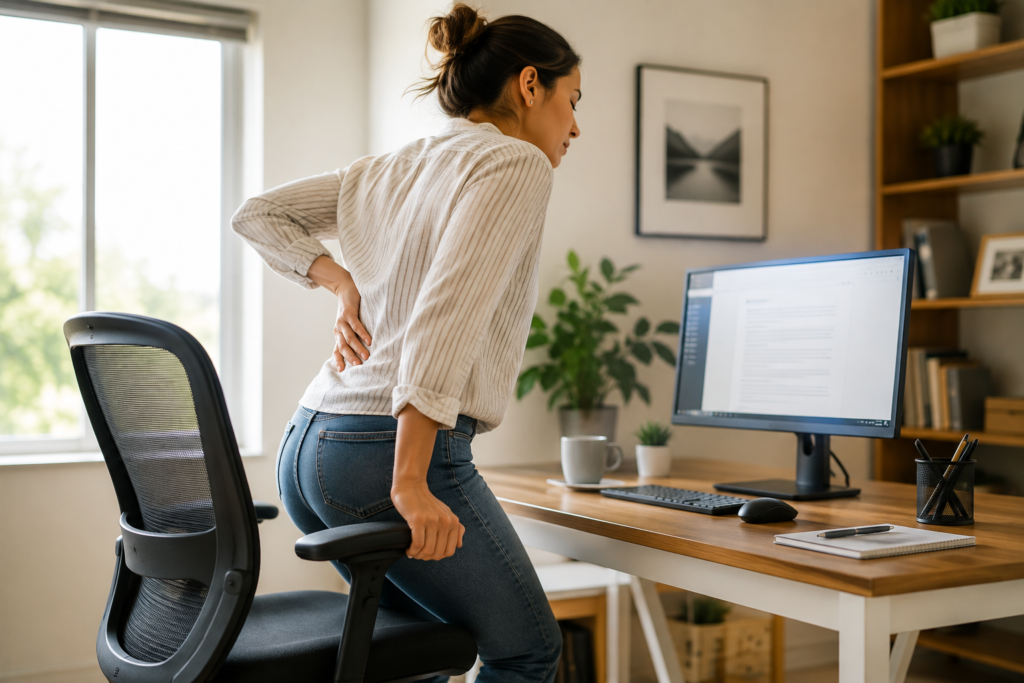
You finish a long stretch of work, stand up from your chair, and suddenly your lower back feels stiff, tight, or uncomfortable.
Sound familiar?
Spending a long time in one position can leave your back and surrounding muscles feeling stiff, especially when your workday involves a computer, long meetings, driving, or very few opportunities to move.
The encouraging part is that you don’t necessarily need an elaborate routine to start changing the way your back feels.
For many people, the most useful first steps are simple: change positions, move gently, improve the way your workstation supports you, and pay attention to symptoms that suggest something more than ordinary stiffness.
This guide explains what you can do when your lower back hurts after sitting, how to make your workspace more comfortable, and when back pain deserves medical attention.
Key Takeaways
- Staying in one position for a long time can contribute to stiffness and discomfort.
- There is no single “perfect” sitting posture that you need to hold all day.
- Regularly changing positions may be just as important as how you sit.
- Gentle walking and movement can be useful after prolonged sitting.
- Heat may temporarily help some people with muscle tightness, but it isn’t appropriate for every situation.
- Your chair, desk, screen, and foot position can influence comfort.
- Persistent, severe, worsening, or neurologic symptoms should be evaluated by a healthcare professional.
Why Can Your Lower Back Hurt After Sitting Too Long?
Sitting itself isn’t automatically harmful.
The bigger issue is often remaining in essentially the same position for a prolonged period, particularly when that position isn’t comfortable or well supported.
While you’re sitting, muscles around your hips, back, and legs remain relatively still. As time passes, you may begin to feel stiff.
Your sitting habits can also matter.
For example, you might gradually:
- Slide forward in your chair
- Lean toward your computer
- Round your shoulders
- Sit unevenly
- Tuck one leg underneath you
- Work without adequate back support
- Stay seated long after your body is telling you to move
None of those automatically means you’ve damaged your back.
But spending hours in an uncomfortable position can certainly make an already sensitive back feel worse.
For a deeper explanation of this topic, read:
Why Lower Back Pain Gets Worse After Sitting
How Do You Know Whether Sitting Is Contributing?
It isn’t always possible to determine the cause of back pain by yourself, and symptoms shouldn’t be used as a diagnosis.
However, you may notice a pattern.
For example:
- Your back feels relatively comfortable when you begin working.
- Stiffness gradually increases while you remain seated.
- Standing and changing position feels good.
- A short walk makes you feel less stiff.
- Long drives or desk sessions tend to trigger similar discomfort.
- Your chair or workstation feels uncomfortable.
- You feel noticeably worse on days when you barely move.
Those patterns can be useful clues when deciding which everyday habits to change.
But if your pain is severe, unexplained, persistent, or associated with other concerning symptoms, don’t simply assume your chair is responsible.
What to Do When Your Lower Back Hurts After Sitting
When you stand up and your back feels stiff, your first instinct might be to stretch aggressively or immediately reach for a pain-relief device.
You don’t necessarily need to.
Start gently.
1. Stand Up and Change Positions
One of the simplest things you can do is simply stop doing what you’ve been doing for the last several hours.
Stand comfortably.
Give yourself a moment to straighten up naturally rather than forcing your spine into an exaggerated position.
You can then walk around the room, refill your water, go to another part of the house, or complete a small standing task.
The purpose isn’t to perform a workout.
It’s simply to give your body a different position and some movement.
Try “movement snacks”
Instead of thinking you need one big exercise session to compensate for an entire day of sitting, build small opportunities for movement into your day.
For example:
- Walk while taking a phone call.
- Stand while reading something.
- Refill your water regularly.
- Walk around during a break.
- Change where you’re working for a few minutes.
- Take the stairs when appropriate.
Small bouts of activity are often easier to maintain than a complicated routine.
2. Take a Short, Comfortable Walk
If walking is comfortable for you, a few minutes of easy movement can be a practical way to transition out of a long sitting period.
You don’t need to walk quickly.
The goal is simply to move.
Pay attention to how your body responds. If walking substantially increases your pain or causes new symptoms, stop and seek appropriate guidance.
3. Try Gentle Mobility Instead of Forcing a Stretch
When your back feels stiff, it can be tempting to stretch as far as possible.
More isn’t necessarily better.
Gentle, controlled movement may be more comfortable than aggressively pulling on sore muscles.
Depending on your health and abilities, simple movements might include:
- Gentle pelvic tilts
- Comfortable knee-to-chest movements
- Cat-cow movements
- Easy hip-flexor mobility
- Slow trunk movement within a comfortable range
Move slowly and never force yourself through sharp or worsening pain.
If you have an injury, significant medical condition, or uncertainty about which exercises are appropriate, speak with a qualified healthcare professional or physical therapist.
4. Consider Heat When Your Back Feels Tight or Stiff
Some people find gentle warmth comforting when their lower-back muscles feel tight.
A heating pad can be convenient, but it should be used as a temporary comfort tool rather than the solution to an entire day of inactivity.
Follow the manufacturer’s instructions for your particular heating pad.
Avoid assuming that:
- Higher temperatures work better
- Longer sessions provide better results
- Falling asleep with a heating pad is safe
- Heat is appropriate for every type of back pain
We just created a detailed guide about this:
Can You Use a Heating Pad Too Much?
If you use heat regularly, that article explains the mistakes and skin-safety precautions worth knowing.
Your Workstation May Be Part of the Problem
You don’t need an expensive ergonomic office to sit more comfortably.
Start by looking at the basic relationship between your body, chair, desk, keyboard, and screen.
Support Your Feet
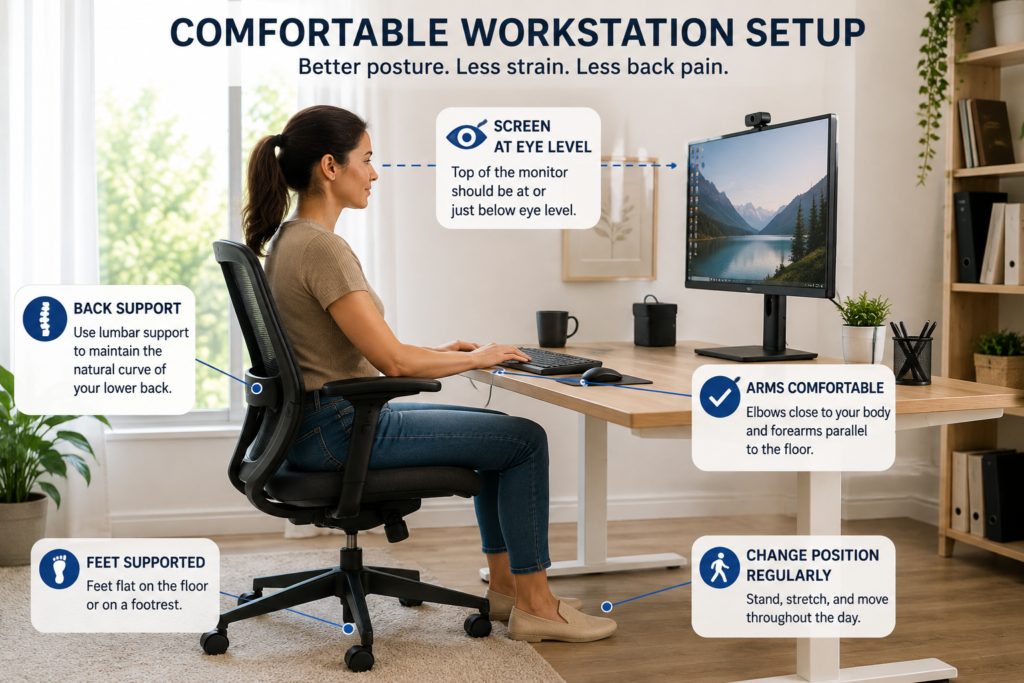
Your feet should have stable support rather than dangling from the chair.
Depending on your setup, that may mean:
- Placing your feet comfortably on the floor
- Adjusting your chair height
- Using an appropriate footrest if necessary
You don’t have to freeze your legs in one exact position all day.
Comfortable variation is okay.
Give Your Lower Back Support
Some people feel more comfortable when the chair supports the natural shape of the lower back.
If your chair has an adjustable lumbar section, experiment with its position.
If it doesn’t, an appropriately sized lumbar cushion may provide additional comfort.
But remember: a lumbar cushion doesn’t replace movement.
Even an excellent chair becomes uncomfortable when you never get out of it.
Bring Your Work Toward You
Watch what happens after you’ve been working for an hour.
Are you gradually leaning toward the screen?
Are your shoulders reaching forward?
Is your laptop so low that you’re constantly looking downward?
Sometimes the solution isn’t “sit up straighter.”
It is to rearrange your equipment so you don’t have to strain to reach or see it.
Position Your Screen Comfortably
Your monitor should allow you to view your work without repeatedly craning your neck or leaning your entire torso toward the screen.
There isn’t one exact monitor position that works for every person and every setup, but your display should generally be easy to see from your normal working position.
Laptop users may find that a separate keyboard and mouse make it easier to raise the laptop screen while keeping their arms comfortable.
Keep Frequently Used Items Within Easy Reach
If you constantly twist to grab your phone, paperwork, mouse, or other supplies, reorganize the workspace.
Place frequently used items where you can reach them comfortably.
Again, the goal isn’t perfect posture.
The goal is reducing unnecessary strain while still changing positions regularly.
For more sitting-position guidance, see:
Best Position to Sit With Lower Back Pain
The Best Sitting Position Is Often Your Next Position
This is one of the most useful ideas to remember.
People sometimes become so focused on maintaining “perfect posture” that they sit rigidly for hours.
That isn’t the goal.
A comfortable, supported position is helpful—but movement and variation matter too.
During your workday you might:
- Sit upright for a while
- Lean back comfortably
- Stand briefly
- Walk for a few minutes
- Sit again
- Adjust your legs
- Change the angle of your chair
Your body isn’t a statue.
Give it opportunities to move.
Should You Stand All Day Instead?
Probably not.
Replacing an entire day of sitting with an entire day of standing simply trades one prolonged position for another.
Standing for long periods can also become uncomfortable.
A more realistic goal is to alternate positions throughout the day.
If you use a sit-stand desk, don’t feel pressured to spend hours standing simply because the desk can rise.
Use it as another way to vary your working position.
What About a Lumbar Support Cushion?
A lumbar cushion can be useful when your chair doesn’t provide enough support.
It may be particularly helpful for:
- Office chairs with flat backs
- Dining chairs used for remote work
- Long drives
- Temporary workspaces
- People who feel more comfortable with additional lower-back support
Choose one that feels supportive without forcing your back into an exaggerated arch.
And don’t let the cushion become a reason to remain seated longer.
For a broader look at home comfort products, see:
Best Back Pain Relief Products for Home Use
A Simple Workday Routine for People Who Sit a Lot
You don’t need to run your day according to a complicated back-pain schedule.
Instead, build movement into things you’re already doing.
When You Start Working
Adjust your chair and screen so you’re comfortable.
Place your feet where they feel supported and arrange your most frequently used items within easy reach.
Throughout the Morning
Change positions periodically.
When you have a natural break between tasks, stand up.
Walk briefly if you can.
Around Lunch
Use part of your break to move rather than spending the entire time in another chair.
Even a comfortable walk around your home, office, or outside can give your body a change of position.
During the Afternoon
This is when many people begin sinking into their chairs or leaning toward their screens.
Reset your workstation if necessary.
Stand, walk, or change positions when you notice stiffness developing.
After Work
Don’t assume you need an intense stretching routine.
A walk, gentle mobility, or comfortable heat may be enough to help you transition out of the workday.
Common Mistakes When Your Back Hurts From Sitting
Mistake 1: Waiting Until You’re Extremely Stiff to Move
You don’t need to wait for your back to hurt before standing up.
Make movement a normal part of the day.
Mistake 2: Trying to Maintain “Perfect Posture” for Eight Hours
No single posture needs to be maintained all day.
Aim for comfortable support plus regular position changes.
Mistake 3: Buying Products Before Fixing the Basics
A premium chair, cushion, standing desk, or heating pad may be useful.
But start with the basics:
- Can your feet reach a stable surface?
- Is your screen easy to see?
- Is your keyboard comfortable to reach?
- Does your chair support you?
- Are you getting up periodically?
Products should support good habits—not replace them.
Mistake 4: Stretching Aggressively Because Your Back Feels Tight
Stiffness doesn’t mean you need to force your body into a deep stretch.
Gentle movement is a more sensible starting point.
Mistake 5: Assuming Every Episode of Back Pain Comes From Sitting
Back pain has many possible causes.
Sitting may aggravate symptoms without necessarily being their underlying cause.
Pay attention to the overall pattern and seek medical evaluation when appropriate.
Daily Habits That May Help You Feel More Comfortable
Move Regularly
Make movement part of your normal routine instead of treating it as something you only do after pain appears.
Exercise Appropriately
General physical activity and appropriate strengthening can support overall health and function.
If you’re unsure what exercise is appropriate because of pain or another medical condition, seek individualized guidance.
Make Your Workspace Fit You
Your body shouldn’t have to constantly adapt to poorly positioned equipment.
Adjust the workspace when possible.
Pay Attention to Sleep Too
If you’re sitting all day and waking up stiff every morning, your nighttime comfort may deserve attention as well.
Your sleep position, mattress, pillows, activity level, and health can all influence how you feel when you wake.
When Lower Back Pain Needs Medical Attention
Back pain is common, but certain symptoms shouldn’t be managed solely with workstation changes and home remedies.
Seek urgent medical attention if back pain is accompanied by symptoms such as:
- New loss of bowel or bladder control
- Numbness around the groin or saddle area
- Significant or worsening weakness
- Severe symptoms after a major fall, collision, or injury
You should also consider medical evaluation when pain:
- Is severe or progressively worsening
- Persists instead of improving
- Regularly interferes with work, sleep, or daily activities
- Travels down a leg, especially with numbness or weakness
- Occurs with fever or feeling seriously unwell
- Is unexplained and concerning to you
A healthcare professional can help determine whether your symptoms are related to muscles and movement or whether another condition needs attention.
Frequently Asked Questions
Why does my lower back hurt when I stand up after sitting?
Remaining seated for a prolonged period can leave muscles and joints feeling stiff, and an uncomfortable workstation may contribute to symptoms. However, back pain has many potential causes, so repeated or severe pain shouldn’t automatically be blamed on sitting.
What’s the fastest way to relieve lower back pain after sitting?
There isn’t one guaranteed “fastest” treatment. If your symptoms are mild and you can move comfortably, changing positions and taking a gentle walk may be reasonable first steps. Heat may also feel comforting for muscle tightness when used appropriately.
How often should I get up from my desk?
There isn’t one mandatory interval that suits everyone. Rather than focusing on a rigid timer, avoid remaining in the same position for very long stretches. Use natural breaks in your workday as reminders to stand, walk, or change position.
Is sitting bad for your back?
Sitting isn’t inherently bad. Problems may arise when you’re uncomfortable, poorly supported, inactive for long periods, or already dealing with a back condition that sitting aggravates.
Is standing better than sitting for lower back pain?
Not necessarily. Prolonged standing can also become uncomfortable. Alternating between sitting, standing, and moving may be more practical than spending the entire day in either position.
Can a heating pad help back pain after sitting?
Gentle warmth may temporarily help some people whose backs feel tight or stiff. Follow your heating pad’s instructions, avoid excessive heat, and don’t use heat as a substitute for evaluating persistent or worsening pain.
Final Thoughts
If your lower back feels stiff every time you stand up after a long period of sitting, don’t focus only on finding the quickest temporary fix.
Look at the whole day.
How long are you staying in one position?
Does your chair support you comfortably?
Are you leaning toward your computer?
Do you have opportunities to walk?
Are you depending on heat, stretching, or a cushion while continuing the same habits that leave you uncomfortable?
For many people, the most realistic strategy is surprisingly simple:
Sit comfortably. Change positions. Move regularly. Adjust your workspace. Pay attention to your symptoms.
And if your pain persists, worsens, or comes with concerning symptoms, get professional medical guidance rather than trying to solve everything with your office chair.
PathwayToRelief.com provides general educational and wellness information only. This content is not intended to diagnose, treat, cure, or prevent any medical condition and is not a substitute for individualized medical advice, diagnosis, or treatment from a qualified healthcare professional. Seek appropriate medical care for severe, persistent, worsening, or concerning symptoms.
PathwayToRelief.com may contain affiliate links. If you purchase through one of these links, we may earn a commission at no additional cost to you. Product mentions are provided for informational purposes and should not be considered medical recommendations.